


Apple Repairs Australia — Mac, MacBook & iMac Repair Specialists
Last Updated:
All Models, Fast Turnaround, No Fix No Fee
Apple breaks. We fix it — fast, anywhere in Australia. The Original PC Doctor has been keeping Macs running since 2001. Our nationwide technician network repairs Mac, MacBook, iMac, Mac mini, Mac Studio and Mac Pro for homes and businesses across every state and territory. Same-day diagnostics, genuine parts where available, fixed prices, and a 3-month warranty on every repair. No fix, no fee.
Need data recovery for an iPhone, iPad or any Apple device? See our Apple data recovery services — we recover from devices we don’t repair too.

Are you searching for Apple Mac repairs near me? We service MacBook Pro, MacBook Air, iMac, Mac Mini, Mac Pro, and all Apple devices. We support all models—including out-of-warranty and vintage Macs—using genuine parts when available.
Book Your Mac Repair Now or call us on 1300 723 628
Complete List of Mac Models We Repair
We repair every Apple Mac model ever made—from the latest M3 MacBooks to vintage Power Mac G5s. If your Mac isn’t listed below, we can still help!
MacBook Pro
- MacBook Pro 16″ (M3 Max/Pro, 2023-2024)
- MacBook Pro 14″ (M3 Max/Pro, 2023-2024)
- MacBook Pro 16″ (M2 Max/Pro, 2023)
- MacBook Pro 14″ (M2 Max/Pro, 2023)
- MacBook Pro 13″ (M2, 2022)
- MacBook Pro 16″ (M1 Max/Pro, 2021)
- MacBook Pro 14″ (M1 Max/Pro, 2021)
- MacBook Pro 13″ (M1, 2020)
- MacBook Pro 16″ (Intel, 2019-2020)
- MacBook Pro 13″ (Intel, 2016-2020)
- MacBook Pro 15″ (Retina, 2012-2019)
- MacBook Pro 13″ (Retina, 2012-2016)
- MacBook Pro 17″ (2006-2012)
- MacBook Pro 15″ (2006-2012)
- MacBook Pro 13″ (2009-2012)
MacBook Air
- MacBook Air 15″ (M3, 2024)
- MacBook Air 13″ (M3, 2024)
- MacBook Air 15″ (M2, 2023)
- MacBook Air 13″ (M2, 2022)
- MacBook Air 13″ (M1, 2020)
- MacBook Air 13″ (Retina, 2018-2020)
- MacBook Air 13″ (2010-2017)
- MacBook Air 11″ (2010-2015)
- MacBook Air 13″ (2008-2009)
MacBook
- MacBook 12″ (Retina, 2015-2019)
- MacBook 13″ (Unibody, 2009-2010)
- MacBook 13″ (2006-2009)
- MacBook (White/Black, 2006-2011)
iMac
- iMac 24″ (M3, 2023-2024)
- iMac 24″ (M1, 2021)
- iMac 27″ (5K Retina, 2014-2020)
- iMac 21.5″ (4K Retina, 2015-2019)
- iMac 27″ (2009-2013)
- iMac 21.5″ (2009-2014)
- iMac 20″ (2006-2009)
- iMac 24″ (Intel Core 2, 2006-2009)
- iMac 17″ (2006-2009)
- iMac G5 (20″, 17″, 2004-2006)
- iMac G4 (2002-2004)
- iMac G3 (1998-2003)
iMac Pro
- iMac Pro 27″ (5K, 2017-2021)
Mac Studio
- Mac Studio (M2 Ultra/Max, 2023)
- Mac Studio (M1 Ultra/Max, 2022)
Mac Mini
- Mac Mini (M2 Pro/M2, 2023)
- Mac Mini (M1, 2020)
- Mac Mini (2018-2020)
- Mac Mini (2010-2014)
- Mac Mini (2006-2009)
- Mac Mini (PowerPC G4, 2005-2006)
Mac Pro
- Mac Pro (M2 Ultra, 2023)
- Mac Pro (2019-2022, “Cheese Grater”)
- Mac Pro (2013, “Trash Can”)
- Mac Pro (2010-2012)
- Mac Pro (2006-2009)
- Power Mac G5 (2003-2006)
- Power Mac G4 (1999-2004)
Apple Data Recovery — All Devices
We don’t repair iPhones, iPads, Apple Watches or AirPods — but we do recover data from them. If your Apple device won’t boot, has a smashed screen, has been water-damaged, or simply died, our forensic data recovery lab can pull your photos, messages, contacts and files from almost any Apple device, including:
- iPhone (all models, including water-damaged and physically broken)
- iPad (all generations)
- MacBook, iMac, Mac mini and Mac Pro internal drives (SSD, Fusion Drive, HDD)
- External Apple-formatted drives and Time Machine backups
- Apple Watch and AirPods (limited recovery scope)
Visit our Apple data recovery hub for full details on devices we cover, success rates and pricing.
Common Apple Mac Issues We Fix
Startup & Boot Problems
- Mac won’t turn on or boot up
- Folder with question mark on startup
- Stuck on Apple logo or progress bar
- Beeping sounds during startup
- Kernel panic errors
Performance Issues
- Spinning beachball of death
- System freezes or unresponsive
- Extremely slow performance
- Overheating or loud fan noise
- Apps crashing frequently
Hardware Failures
- Cracked or broken screen
- Flickering display or no backlight
- Keyboard keys not working
- Trackpad not responding
- Power button failure
- Battery draining fast or not charging
Physical Damage
- Liquid spills (water, coffee, wine)
- Dropped or impact damage
- Swollen or exploded battery
- Bent chassis or housing damage
- Port damage (USB, Thunderbolt, MagSafe)
Software & System Issues
- macOS update or installation errors
- Forgotten passwords or account lockouts
- Virus or malware removal
- System configuration problems
- Software compatibility issues
Data & Storage
- Data recovery from dead Macs
- Deleted file recovery
- CD/DVD stuck in drive
- SSD or HDD upgrades
- Storage full or disk errors
Connectivity Issues
- Wi-Fi not connecting or dropping
- Bluetooth problems
- Network connectivity issues
- iPhone/iPad sync failures
- External display not working
Upgrades & Enhancements
- RAM memory upgrades
- SSD hard drive upgrades
- macOS installation and migration
- Performance optimization
- Component replacements
Why Choose The Original PC Doctor?
💰 No Fix, No Fee™ – If we can’t fix your Mac, you pay nothing. Clear pricing before work begins—no surprises.
🛡️ 3-Month Warranty – All repairs backed by our 3-month parts and labor warranty, plus 14-Day Work Satisfaction Guarantee.
⚡ Fast Turnaround – Same-day or next-day service available. Emergency and after-hours support when you need it.
✅ Genuine Parts – We use genuine Apple parts where possible, or high-quality OEM alternatives with full warranty.
🏠 Onsite Service – We come to your home or office, or offer secure courier pickup across all major Australian cities.
🔒 Data Security – Your data is treated as confidential and secure. We never share or access your personal information.
🎓 Expert Technicians – Certified Apple repair specialists with over 20 years of Mac experience since 2001.
🇦🇺 Australia-Wide – Servicing all major cities and suburbs across Australia with local, personalized support.
See Our Apple Mac Repairs in Action

iMac GPU/Motherboard Repair

Spinning Beach Ball Fix

Mac Won’t Boot – Fixed

MacBook Air Run Over by Car

MacBook Cracked Screen

MacBook Exploded Battery

MacBook Liquid Damage Repair

MacBook Keyboard Replacement
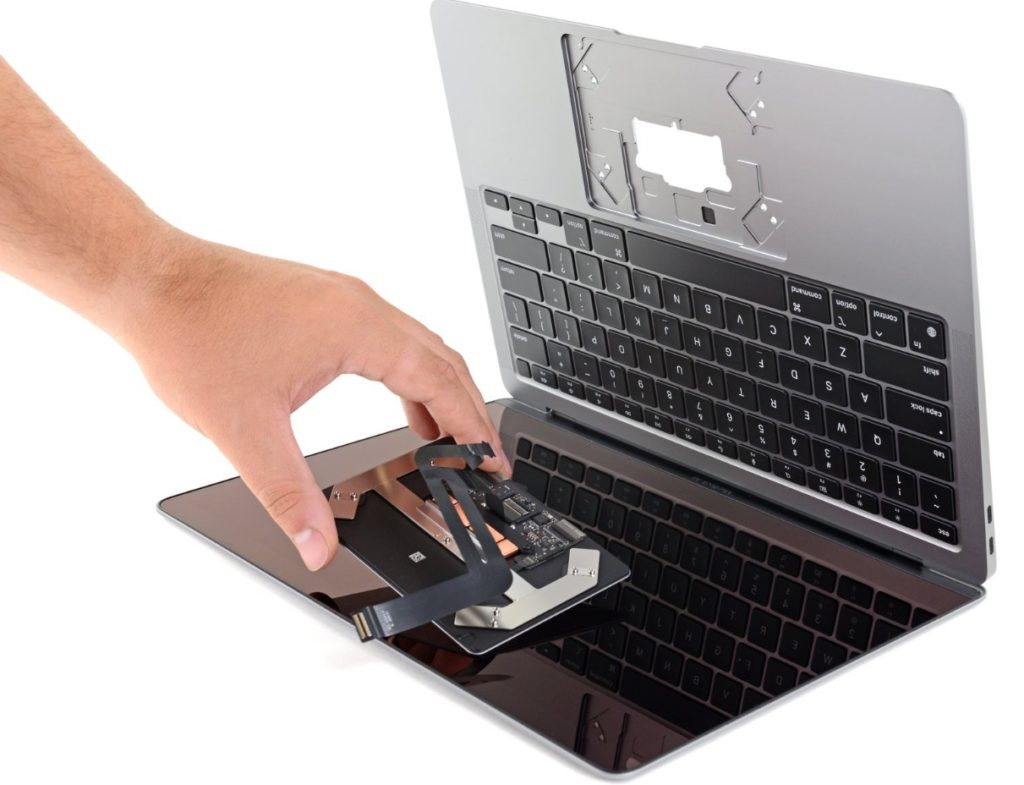
MacBook Touchpad Replacement
Mac Repair Pricing & Guarantee
Our Pricing Promise
- Free quote and diagnosis over the phone or on-site
- No Fix, No Fee™ – If we can’t fix it, you pay nothing
- Clear, upfront pricing before any work begins
- No hidden fees or surprise charges
- Competitive rates – often faster and more affordable than Apple Store
Service & Support
- Same-day or next-day service available
- On-site repair at your home or office
- Secure courier pickup and delivery
- Emergency and after-hours support
- Weekend appointments available
Our Guarantees:
- 3-Month Warranty on all parts and labor
- No Fix No Fee™ – You only pay if we successfully repair your Mac
- 14-Day Work Satisfaction Guarantee™ – Complete peace of mind
Frequently Asked Questions
Can you repair my Mac if it’s out of warranty or very old?
Absolutely! We support all Apple Mac models—including out-of-warranty, vintage, discontinued, and even PowerPC Macs. If your Mac is from 1998 to 2024, we can help. We specialize in keeping older Macs running when Apple no longer services them.
How much does a typical Mac repair cost?
Repair costs vary depending on the issue and model. We offer a free quote and “No Fix, No Fee” guarantee. Most repairs range from $150-$600, but we’ll give you exact pricing before starting work. Simple fixes like software issues or battery replacements are often more affordable, while logic board or screen repairs can cost more. We’re often faster and more cost-effective than the Apple Store.
Will I lose my data during repair?
We do our absolute best to keep all your data safe during repairs. In most cases, your data remains untouched. However, if your Mac won’t boot or has a failing hard drive, we recommend our professional MAC data recovery services to ensure nothing is lost. We can also create secure backups before starting repairs.
Do you use genuine Apple parts?
Yes, whenever possible we use genuine Apple OEM parts. For older or discontinued models where genuine parts aren’t available, we use high-quality compatible parts that meet or exceed Apple’s standards. All parts come with our 3-month warranty.
Do you do on-site repairs?
Yes! We can repair most Mac issues on-site at your home or office. For complex repairs requiring specialized equipment, we offer secure courier pickup and return. We service all major Australian cities and suburbs.
How long does a Mac repair take?
Most repairs are completed within 24-48 hours. Simple software fixes or battery replacements can often be done same-day. More complex repairs like logic board or screen replacements may take 2-5 business days depending on parts availability. We’ll give you an estimated timeline with your quote.
What if my Mac is not repairable?
If your Mac is beyond economical repair or worth less than $100, we’ll let you know honestly. We can still recover your data in most cases, and we recommend recycling it responsibly. We can also help you migrate to a new or refurbished Mac.
Can you upgrade my old Mac instead of replacing it?
Absolutely! We can upgrade RAM, replace traditional hard drives with blazing-fast SSDs, install the latest compatible macOS, and optimize performance. An SSD upgrade alone can make a 10-year-old Mac feel brand new. We’ll assess your Mac and recommend the most cost-effective upgrades.
Ready to Fix Your Mac?
Don’t let a broken Mac slow you down. Our expert technicians are ready to help with fast, affordable repairs backed by our No Fix No Fee guarantee.
Book Online Now OR Call 1300 723 628
All repairs backed by our No Fix No Fee™ and 14-Day Work Satisfaction Guarantee™
All of our Apple Mac repairs are backed by our No Fix No Fee™ and 14-Day Work Satisfaction Guarantee™.
Call our local team now on 1300 723 628 for fast, expert Apple Mac repairs—Australia-wide.
{
“@context”: “https://schema.org”,
“@type”: “Service”,
“name”: “Apple Repairs Australia”,
“provider”: {
“@type”: “LocalBusiness”,
“name”: “The Original PC Doctor”,
“url”: “https://thepcdoctor.com.au/”
},
“areaServed”: {
“@type”: “Country”,
“name”: “Australia”
},
“serviceType”: “Apple Computer Repair”,
“url”: “https://thepcdoctor.com.au/apple-repairs”,
“hasOfferCatalog”: {
“@type”: “OfferCatalog”,
“name”: “Apple Repair Services”,
“itemListElement”: [
{
“@type”: “Offer”,
“itemOffered”: {
“@type”: “Service”,
“name”: “MacBook Pro Repair”,
“url”: “https://thepcdoctor.com.au/apple-macbook-pro-repair”
}
},
{
“@type”: “Offer”,
“itemOffered”: {
“@type”: “Service”,
“name”: “MacBook Air Repair”,
“url”: “https://thepcdoctor.com.au/apple-macbook-air-repair”
}
},
{
“@type”: “Offer”,
“itemOffered”: {
“@type”: “Service”,
“name”: “iMac Repair”,
“url”: “https://thepcdoctor.com.au/apple-imac-repairs”
}
},
{
“@type”: “Offer”,
“itemOffered”: {
“@type”: “Service”,
“name”: “Mac mini Repair”,
“url”: “https://thepcdoctor.com.au/apple-mac-mini-repairs”
}
},
{
“@type”: “Offer”,
“itemOffered”: {
“@type”: “Service”,
“name”: “Mac Studio Repair”,
“url”: “https://thepcdoctor.com.au/apple-mac-studio-repairs”
}
},
{
“@type”: “Offer”,
“itemOffered”: {
“@type”: “Service”,
“name”: “Mac Pro Repair”,
“url”: “https://thepcdoctor.com.au/apple-mac-pro-repairs”
}
},
{
“@type”: “Offer”,
“itemOffered”: {
“@type”: “Service”,
“name”: “Apple Data Recovery”,
“description”: “iPhone, iPad and Mac data recovery”
}
}
]
}
}
Apple Repairs faults we repair every week
Flexgate display cable failure
Symptom: Flickering or black screen on 2016-2019 13-inch and 15-inch MacBook Pro models when lid is opened past 45 degrees
How we fix it: Technician removes top case, replaces the damaged display flex cable assembly with genuine Apple part and recalibrates brightness sensor
Repair or replace? repair
T2 chip boot failure
Symptom: MacBook Pro or iMac with T2 security chip shows flashing folder or refuses to boot after power loss or liquid exposure
How we fix it: Technician performs DFU restore via Apple Configurator on another Mac, or replaces logic board if T2 chip is damaged
Repair or replace? Depends
iMac 27-inch 5K Retina backlight failure
Symptom: Screen appears dim or completely dark while external display works normally on 2014-2020 models
How we fix it: Technician removes display assembly, replaces failed LED backlight strips and tests inverter circuit on the T-CON board
Repair or replace? repair
MagSafe 2 DC-in board corrosion
Symptom: MacBook Pro 13-inch and 15-inch 2012-2015 models fail to charge or show green/orange light issues after liquid spill near ports
How we fix it: Technician desolders corroded MagSafe 2 DC-in board, cleans or replaces the board, then reseals port area
Repair or replace? repair
MacBook Air butterfly keyboard failure
Symptom: Keys on 2018-2020 MacBook Air stop registering or repeat letters due to debris under butterfly mechanism
How we fix it: Technician replaces entire top case assembly including new butterfly keyboard and battery as Apple no longer services individual keys
Repair or replace? replace
Mac Pro 2019 GPU module overheating
Symptom: 2019 Mac Pro shuts down under load with diagnostic LEDs showing GPU thermal fault
How we fix it: Technician removes side panel, cleans dust from MPX module heatsink, reapplies thermal paste and verifies fan calibration
Repair or replace? repair
Apple Repairs price guide
| Repair | Indicative price | Typical turnaround |
|---|---|---|
| MacBook Pro Flexgate display cable replacement | $380-$520+ | 2-4 business days |
| iMac 27-inch 5K backlight strip replacement | $420-$580+ | 3-5 business days |
| MacBook Air 2018-2020 top case and keyboard replacement | $650-$890+ | 2-4 business days |
| MacBook Pro MagSafe 2 DC-in board repair | $220-$310+ | 1-3 business days |
| T2 chip DFU restore or logic board replacement | $180-$1450+ | 1-5 business days |
| Mac Pro 2019 GPU module thermal service | $240-$340+ | 2-3 business days |
| Mac mini M1/M2 logic board replacement | $680-$920+ | 3-5 business days |
Prices are indicative only — every job is confirmed with a free, no-obligation quote after diagnosis. No Fix, No Fee.
Apple Repairs — your questions answered
How much does it cost to repair a MacBook Pro Flexgate issue?
Replacement of the display flex cable on affected 2016-2019 MacBook Pro models typically ranges from $380 to $520 including parts and labour. Our technicians use genuine Apple cables where available and provide a three-month warranty on the repair. Turnaround is usually two to four business days once the machine reaches our workshop.
Can you fix a Mac that won't turn on after liquid damage?
Yes. We perform same-day diagnostics on liquid-damaged Macs and quote for board-level cleaning or component replacement. If the T2 chip or logic board requires replacement, costs start from around $680 and can reach $1450 depending on the model. No fix, no fee applies if we cannot recover the machine.
Do you repair out-of-warranty iMacs with dim screens?
We repair 2014-2020 27-inch 5K iMacs with failed backlight strips. The job involves removing the display assembly and replacing the LED strips, with prices between $420 and $580. Turnaround is typically three to five business days and we supply a three-month warranty.
How long does a MacBook Air keyboard replacement take?
For 2018-2020 MacBook Air models we replace the entire top case assembly. The repair takes two to four business days and costs between $650 and $890. We do not offer individual key repairs on butterfly keyboards as Apple supplies only complete assemblies.
Do you service vintage Power Mac G5 or early Intel Macs?
Yes. Our technicians maintain stock of legacy parts for G5, G4 and early Intel models. Common services include power supply replacement, hard drive upgrades and logic board repairs. Pricing varies by model and parts availability; we provide a fixed quote after diagnostics.




























