Mac Data Recovery Australia — Recover Files from MacBook and iMac

Last Updated:

Lost data? Stop using the device and act now — early action is the biggest factor in successful recovery.

✔ Free file list before you pay  ·  ✔ Free phone assessment  ·  ✔ ISO-5 Class 100 clean room  ·  ✔ 20+ years experience

👇 Scroll to the bottom of this page for free resources, guides, and blog articles — including our most popular speed-up tips and expert advice.

Lost precious photos, important documents, or years of work from your Mac? The Original PC Doctor provides professional Mac data recovery across Australia. We recover data from MacBooks, iMacs, Mac Minis, and Mac Pros — whether the drive has failed, files were accidentally deleted, or your Mac suffered water damage. Submit our Free Quick Quote form on this page and we will give you an honest indication of recovery options and likely cost band before you commit to anything. A diagnostic fee applies once we receive the device, with a fixed-price written quote provided before any recovery work begins.

We also recover data from Windows PCs — see our general data recovery page. For Mac hardware repairs, see Mac repair hub, MacBook screen repair, or iMac repair.

Customer experiencing computer problem - Mac Data Recovery Australia | Recover Fi

Mac Data Recovery Services

💾 MacBook SSD Recovery

Modern MacBooks use SSDs that can fail without warning. We recover data from failed, corrupted, or unreadable MacBook SSDs. For M-series Macs with soldered storage (M1, M2, M3, M4), we use chip-level recovery methods.

You might also look for: MacBook data recovery near me, recover files from dead MacBook, MacBook SSD failed data recovery Australia

🖥️ iMac Hard Drive and Fusion Drive Recovery
Older iMacs with spinning hard drives are prone to mechanical failure — clicking sounds, grinding, or simply not mounting. We recover data from all iMac drives including Apple Fusion Drive configuration. iMac repair →
💧 Water Damage Data Recovery
Spilled liquid on your MacBook? Even if the machine is dead, your data may be recoverable. We carefully extract the storage device and attempt recovery separately. The sooner you contact us after the spill, the better the chances.
🗑️ Accidentally Deleted File Recovery
Emptied the Trash and realised you needed those files? Formatted the wrong drive? We can often recover recently deleted files — especially if you stop using the computer immediately after deletion. The less you use the drive, the higher the success rate.
🔐 Encrypted Drive Recovery (FileVault)
FileVault-encrypted drives that have failed can still be recovered in many cases — you will need your Apple ID password or recovery key. We work with encrypted drives regularly and guide you through the process.
📦 External Drive and Time Machine Recovery
Failed external hard drive? Corrupted Time Machine backup? We recover data from USB drives, Thunderbolt drives, NAS devices, and SD cards used with Macs.

💾 Lost Mac Data? Free Quick Quote — Free Quick Quote

Describe what happened and we will assess recovery chances — You see a full list of the files we recovered before you pay.

Common Mac Data Loss Scenarios We Handle
Mac will not boot — stuck on Apple logo, spinning wheel, or question mark folder
Accidental deletion — emptied Trash, formatted wrong drive
Water/liquid damage — coffee, water, wine spill on MacBook
Drive failure — clicking, grinding, or not recognised
Failed macOS update — bricked after Big Sur/Ventura/Sonoma/Sequoia update
Ransomware — encrypted or locked files

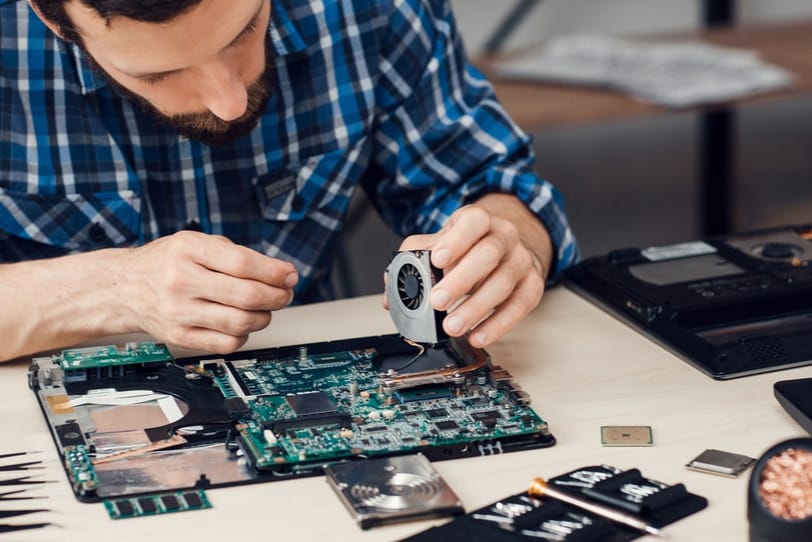
Data recovery technician working on a Mac hard drive in a professional setting

What Can Go Wrong With DIY Data Recovery?

⚠️ Running Disk Utility or First Aid on a Failing Drive
If your drive is physically failing (clicking, grinding), running Disk Utility can make things much worse. Each read attempt puts more stress on a dying drive. Professional recovery uses forensic imaging that reads the drive once, gently, before any repair attempts.
⚠️ Free Recovery Software Overwriting Data
Some “free” recovery tools actually write data to the same drive they are recovering from — potentially overwriting the very files you are trying to save. We use read-only forensic tools that never modify the source drive.
⚠️ Opening a Hard Drive Outside a Clean Room
Spinning hard drives have microscopic tolerances. A single dust particle can scratch the platters and destroy data permanently. Serious hardware recoveries require ISO-5/Class 100 clean room facilities.
⚠️ Attempting Recovery on M-series Macs Without Specialist Tools
M1/M2/M3/M4 Macs have storage soldered to the logic board. There is no removable SSD to extract. Recovery requires specialist chip-level tools and techniques that are not available to consumers.
⚠️ Continuing to Use the Mac After Data Loss
The single biggest mistake. Every file you create, every app you open, every webpage you visit after deletion can overwrite your lost data. Turn off the Mac immediately and call a professional.

Is Mac Data Recovery Worth the Cost?

✅ Recovery Is Worth It When…

  • Irreplaceable photos or documents
  • Business-critical files (accounting, client data)
  • Years of work with no backup
  • Legal or compliance requirements
  • Sentimental value (family photos, videos)

❌ May Not Be Worth It When…

  • Everything is backed up to iCloud/Time Machine
  • Files can be re-downloaded or recreated
  • Drive has been physically destroyed
  • Recovery cost exceeds data value

Our Free Quick Quote policy removes the financial risk. We diagnose free and quote before proceeding. More decision guides →

Need Help? Get a Free Quote

Submit the form for a free quote within 30 minutes — since 2001

✅ Assessment Fee Applies✅ Same-Day Service✅ 1,300+ Reviews✅ Since 2001

PC Doctor technician helping customer - Mac Data Recovery Australia | Recover Fi

Mac Data Recovery Australia - Happy customer with resolved issue

Free Resources

Independent, non-commercial references:

Get your data back — free file list, free phone assessment. Talk to a specialist today.

✔ Free file list before you pay  ·  ✔ Free phone assessment  ·  ✔ ISO-5 Class 100 clean room  ·  ✔ 20+ years experience

Frequently Asked Questions

Can you recover data from a dead MacBook?
In most cases, yes. Even if your MacBook will not turn on, the SSD may be intact. We extract the storage and recover files. For M-series Macs with soldered storage, chip-level techniques are used.
How much does Mac data recovery cost?
request a quick quote online for simple logical recoveries (deleted files) to varies for chip-level recovery on M-series Macs. Free phone assessment and firm quote. Free Quick Quote — You see a full list of the files we recovered before you pay.
Can you recover from a water-damaged MacBook?
Yes, in many cases. Water damage to the logic board does not necessarily mean the SSD is damaged. The sooner you bring it to us, the higher the success rate.
How long does Mac data recovery take?
Simple recoveries 1-3 days. Complex cases 3-7 days. Priority rush service available for urgent cases.
Should I try recovery software first?
Only if the drive is NOT physically failing (no clicking or grinding sounds). And never install recovery software onto the same drive. If in doubt, call us first — bad recovery attempts can make data unrecoverable.
Do you recover from Time Machine backups?
Yes. Corrupted or failed Time Machine drives can often be recovered. We also recover from external USB, Thunderbolt, and NAS drives.

Mac Data Recovery Service Areas Across Australia

We provide onsite mac data recovery services in all major Australian cities. Our technician comes to your home or office — usually same-day.

📍 Melbourne and Victoria

Mac Data Recovery Melbourne — Brighton, Camberwell, Doncaster, Glen Waverley, Hawthorn, Kew, Malvern, Ringwood, Toorak, Box Hill, Caulfield, Frankston, Mornington, Werribee

Geelong | Ballarat | Bendigo

📍 Sydney and NSW

Mac Data Recovery Sydney — Bondi, Chatswood, Cronulla, Epping, Hornsby, Manly, Mosman, North Sydney, Parramatta, Penrith, Castle Hill, Hurstville, Ryde

Newcastle | Wollongong

📍 Brisbane and QLD

Mac Data Recovery Brisbane — Ascot, Bulimba, Carindale, Chermside, Indooroopilly, New Farm, Paddington, Toowong, Mount Gravatt, Wynnum

Gold Coast | Sunshine Coast

📍 Perth, Adelaide, Canberra, Hobart and Darwin

Mac Data Recovery Perth — Applecross, Claremont, Fremantle, Joondalup, Morley, Nedlands, Subiaco

Mac Data Recovery Adelaide — Burnside, Glenelg, Norwood, Prospect, Unley

Mac Data Recovery Canberra | Mac Data Recovery Hobart | Mac Data Recovery Darwin

Plus hundreds of regional towns. Find your nearest technician →

⚡ SSD and RAM Upgrades — Speed Up Your Computer

SSD Upgrade — 5-10x faster boot and load times | RAM Upgrade — Fix slow multitasking | All Upgrades

Frequently searched: SSD upgrade near me, how to speed up my computer, computer upgrade service Australia

💻 Laptop Repairs — Screen, Battery, Keyboard and More

Laptop Repairs | Screen Replacement | Battery Replacement | Keyboard Replacement

Top searches in this area: laptop repair near me, laptop screen repair cost, laptop not charging fix

🏷️ Brand-Specific Repair — HP, Dell, Lenovo, ASUS, Acer, Samsung, MacBook
🍎 Mac Repairs — MacBook, iMac and Apple Service

Mac Repair Hub | iMac Repair and SSD Upgrade | Mac Data Recovery

What Australians are searching: MacBook repair near me, iMac running slow, Mac data recovery Australia

🎮 Specialist Services — Gaming, Virus, Data Recovery, BSOD
📖 Helpful Guides

Free Resources and Guides

Explore these articles from our blog for more Mac tips and expert advice:

📖 Mac vs PC: The Ultimate Guide 2026

Everything you need to know about choosing between Mac and PC in 2026 — performance, price, repairability, and longevity.

Read the full guide →

📖 Apple Data Recovery Services — Expert Guide

Lost data on your Mac? Our in-depth guide covers what to do, what NOT to do, and how professional Mac data recovery works.

Read the full article →

📖 How to Speed Up a Slow Computer

Comprehensive guide to making any computer faster — from quick software fixes to hardware upgrades like SSD and RAM.

Read the full guide →

Responsible E-Waste Recycling

♻️ Where to Recycle E-Waste in Australia (State by State)

Please do not put old computer parts in the bin. E-waste contains toxic materials. Australia generates over 500,000 tonnes of e-waste per year.

National: Recycling Near You | TechCollect (free, government-backed)

VIC: Sustainability Victoria (banned from landfill) | NSW: NSW EPA | QLD: QLD Gov

SA: Green Industries SA | WA: WA Waste Authority | TAS/ACT/NT: Council drop-off facilities

Before recycling any computer, ensure data is securely erased. Secure data erasure services →


Want a Quick Quote?

Computer Issues? Enter your details below, and one of our helpful helpdesk staff will contact you back in 30 minutes or less to give you a free, no-obligation quick quote.

    🔒 Your details stay private and secure (Privacy Policy).

    The Original PC Doctor - 25 years of business excellence